Meta Title: How to Set Up App Controlled Outdoor Lights | Aurora Sky Lighting
Meta Description: Learn how to set up app controlled outdoor lights for convenience and style. Step-by-step tips for connecting, automating, and enjoying smart lighting.
URL Slug: /blog/how-to-set-up-app-controlled-outdoor-lights
How to Set Up App Controlled Outdoor Lights
Smart home technology has made it easier than ever to control outdoor lighting. With app controlled outdoor lights, you can adjust brightness, change colors, and automate schedules right from your phone. Whether you’re enhancing security, setting the mood for gatherings, or managing holiday displays, app control brings convenience and flexibility.
Why Choose App Controlled Outdoor Lights?
Traditional light switches limit your options. App control, however, gives you flexibility and personalization that fits your lifestyle.
Benefits include:
- Convenience: Manage lights from anywhere.
- Customization: Adjust brightness, color, and patterns.
- Automation: Set schedules for daily routines or holidays.
- Security: Simulate occupancy when you’re away.
- Integration: Connect with smart home devices and voice assistants.
Step 1: Choose the Right Smart Lighting System
Start by selecting an outdoor lighting system compatible with app control. Popular options include permanent soffit lights, smart string lights, or flood lights. Ensure the system supports features like scheduling, dimming, and color-changing modes.
Step 2: Install Your Lights
Depending on the type, installation may be DIY-friendly or require professional help. For soffit lighting or permanent Christmas lights, professional installation ensures safe wiring and even placement. For plug-in string lights, DIY installation may be sufficient.
Step 3: Download the App
Most smart lighting systems come with a proprietary app. Once installed, follow the manufacturer’s instructions to pair your lights with your phone. Make sure your Wi-Fi connection is strong in outdoor areas.
Step 4: Connect and Configure
Use the app to connect your lights to your home network. From there, you can configure settings:
- Create groups of lights for different zones (front yard, patio, roofline).
- Adjust brightness and color.
- Set schedules for automatic on/off times.
- Enable holiday or seasonal presets.
Step 5: Integrate With Smart Home Systems
For added convenience, integrate your outdoor lighting with Alexa, Google Home, or Apple HomeKit. Voice control allows you to turn lights on or off, dim them, or change colors without opening the app.
Step 6: Automate for Every Season
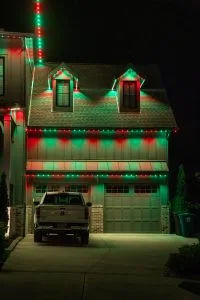
One of the best features of app controlled outdoor lights is seasonal automation. Set colorful patterns for holidays, warm tones for cozy fall nights, or bright illumination for summer gatherings. You can even schedule lights to adapt with daylight savings changes.
Troubleshooting Tips
- Ensure your Wi-Fi extends outdoors with a booster if needed.
- Regularly update your app and firmware.
- Reset and re-pair lights if they lose connection.
- Use surge protectors to safeguard against power issues.
Aurora Sky Lighting’s Expertise
At Aurora Sky Lighting, we specialize in installing outdoor lighting systems that seamlessly integrate with smart apps. From soffit lighting to permanent holiday displays, we ensure your setup is both stylish and easy to manage. With our professional installations, you’ll enjoy worry-free smart lighting for years.